Over the past two months, I dedicated myself to obtaining the Red Hat Certified System Administrator (RHCSA) certification. This experience has significantly deepened my understanding of Linux, equipping me with knowledge that will undoubtedly be valuable in both my career and the tech industry.
Why Linux?
My interest in Linux began a few years ago during a Technology and Innovation class in high school. I was working on various projects that sparked my curiosity about this open-source operating system. Since then, I’ve enjoyed experimenting with different Linux distributions, downloading ISO images, and setting up dual-boot environments on my devices. Among the distros I’ve tried, Pop!_OS has become my favorite, though that’s a topic for another post.
Despite dabbling in Linux over the years, like fixing GRUB issues a few times, I hadn’t had the opportunity to fully immerse myself in its core principles, tools, and overall system architecture. While I could have potentially explored this in one of my future degree courses, my current curriculum only offers basic General Engineering classes, which don’t delve into Computer Science or System Administration. That’s why I decided to pursue this Linux certification now.
Why Red Hat?
Initially, I considered pursuing the LPIC certification path, but after reading numerous reviews on YouTube and gathering opinions from X, Reddit, and LinkedIn, I concluded that the RHCSA would be a more challenging and rewarding experience. Unlike many other certifications that rely heavily on multiple-choice logic questions, testing extensive theoretical knowledge without necessarily gauging practical application, the RHCSA exam is different. It evaluates your ability to perform real-world Linux tasks, focusing on practical skills essential for a System Administrator.
The RHCSA is a hands-on exam where your performance is assessed based on how well you complete a series of tasks. This means that to succeed, I needed to master both theoretical concepts and the practical skills necessary to apply them effectively.
During the exam, you’re required to complete various practical assignments using your knowledge across two nodes, depending on the specific task. The exam covers a comprehensive range of core Linux tools and skills every system administrator should be proficient in. Now that I’ve successfully earned the certification, I’m confident in my ability to handle the following areas:
- Managing basic networking
- Understanding and using essential tools
- Operating running systems
- Configuring local storage
- Creating and configuring file systems
- Deploying, configuring, and maintaining systems
- Managing users and groups
- Managing security
- Managing containers
- Creating simple shell scripts
This certification journey also served as my introduction to containerization, a topic that truly fascinates me. I’m amazed by the concept of open source and the potential of containerization to create versatile, easily deployable software. Even though I’ve only scratched the surface, I’m eager to delve deeper into this field in future certifications and testing experiences.
How I Did It
The short answer would be “studying,” but my preparation can be broken down into three distinct phases. Here’s a closer look at each one.
1st Phase: The Warm-Up
Starting this summer, specifically on June 1st, 2024 I committed myself to studying Linux (RHEL) day and night to ensure I was fully prepared for the exam. I enrolled in my my university’s cybersecurity club Red Hat Academy program and went through around 3/4ths of the RH124 course, then I purchased several courses on Udemy, a popular online learning platform, and spent the rest first month going through them.
The first Udemy course I completed was largely theoretical. In hindsight, it felt somewhat outdated compared to the current RHEL 9 exam topics. However, the course encouraged hands-on practice, urging students to try out the concepts on their own Linux virtual machines. This approach was instrumental in helping me grasp many Linux concepts, from Command Line Interface (CLI) basics to Network Administration and even a bit of Containerization.
I meticulously took notes on everything covered in the course, ensuring I absorbed as much information and knowledge as possible. I also followed the instructor’s advice to replicate every exercise in my virtual machine, which provided me with some valuable hands-on experience. This phase was quite extensive and occupied the entire month of June 2024.
2nd Phase: Objective Verification
After completing the first RHCSA-focused course, I wanted to verify that what I’d learned aligned with the current exam objectives set by Red Hat. This was when I realized that, despite feeling like I had learned a lot, the course was quite basic and mostly theoretical. I still needed to develop core practical skills if I wanted to succeed in the exam.
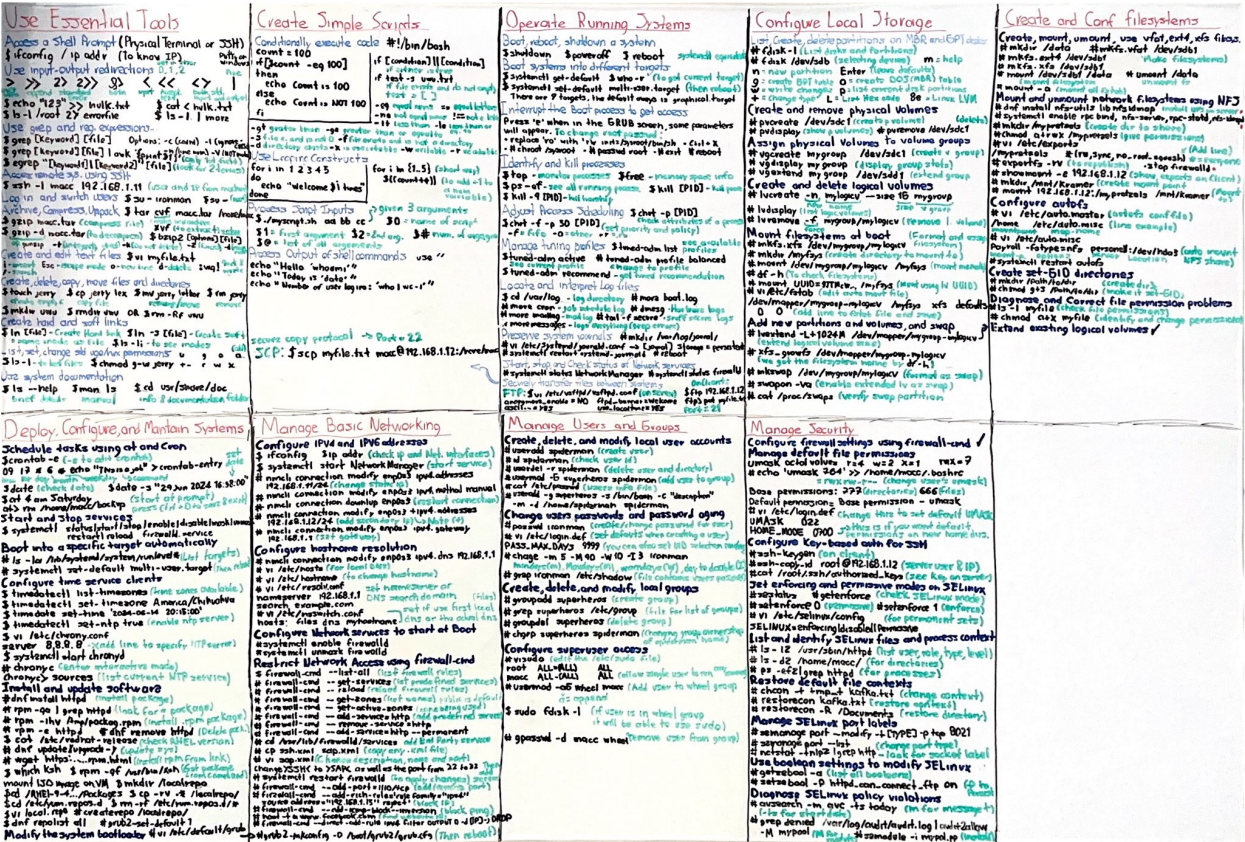
To tackle this, I decided to use an old wall-mounted whiteboard. I gave it a good clean and started writing down each of the RHCSA EX200 objectives, accompanied by brief examples of relevant commands and their uses. I drew from both the course material and additional research, simply Googling the objective titles to find examples that others had shared for study and practice. For instance, when working on how to automatically mount Network Filesystems, I referred to the official Red Hat documentation. To my surprise, it wasn’t as difficult as I’d anticipated, and it reinforced the importance of using reliable sources.
I prefer using a physical whiteboard when studying extensive topics or math-related subjects because it allows me to get a general overview of what I’m studying. Seeing everything laid out helps me focus, and I find it motivating to keep adding new information. However, by the time I almost finished writing out everything, with just the Containers topic left, I started feeling that this method wasn’t the best use of my time for this particular exam. Although it’s an efficient study technique that I’ve developed over time, I realized that because this is a fully practical test, I needed to shift my focus from writing things down to actually practicing commands.
This phase lasted about two weeks.
3rd Phase: Practice Tests
By the time I had completed the extensive Linux course and verified my knowledge against the exam objectives on my whiteboard, the only thing left to do was to practice real-world tasks to prepare for the fully hands-on exam. To do this, I purchased a second Udemy course, but this time it wasn’t an explanatory course with lectures. Instead, it consisted of six practice tests, each containing around 43 questions. Each question represented a task similar to those found in the RHCSA EX200 exam.
I diligently worked through every single task to gain as much hands-on experience as possible. Despite having spent the previous month on an extensive course and thoroughly reviewing each exam objective, I found these practice questions challenging. Some tasks left me completely stumped at first. To overcome these hurdles, I relied on Google and various guides shared by others to understand and complete the tasks I struggled with. This process of researching and applying what I learned allowed me to not only complete the practice exams but also gain a deeper understanding of each task.
This final phase lasted about two weeks as well. Once I completed the sixth and final practice test, I felt confident and scheduled my exam for the next day. I knew I was prepared.
The EX200 Exam
I have to admit, I never felt completely prepared for the exam, but I was confident in the knowledge and skills I had gained over the past two months. Given all the time and effort I had invested, I decided not to wait any longer and scheduled the exam while the information was still fresh in my mind. The day before the exam, I was reviewing the practice questions I had worked on, but then it hit me, I needed to familiarize myself with the exam policies and instructions. The exam requires you to download an ISO image for the Red Hat testing software, which, interestingly enough, is a Fedora-based distribution. You’re then instructed to create a bootable USB drive with the ISO and use it to boot your computer into the testing environment.
They strongly recommend testing your USB drive and computer beforehand by booting into the USB and running a hardware test to ensure all your devices are compatible for the exam. This is when I encountered a major issue: my laptop, which I had been using for all my virtual machines, note-taking, and study sessions, wasn’t displaying the BIOS on an external monitor. The Red Hat testing environment is configured to block output to secondary monitors since only one screen is allowed during the exam. This meant I had to use my laptop’s built-in screen, which is only 14 inches, a less-than-ideal setup for a rigorous three-hour exam. Fortunately, my brother had a backup desktop PC that saved the day. It was a Lenovo ThinkCentre with 8 GB of RAM, about the size of my hand, which just met the minimum requirements to run the Red Hat testing software. While it wasn’t the fastest or most powerful machine, it worked well enough for me to take the exam using my external 24-inch monitor, along with a full-sized keyboard and mouse.
The day of the exam arrived, and I was very nervous about what was going to happen. I scheduled the exam for 11 AM, which I believe is an ideal time to start a three-hour exam. It gave me plenty of time in the morning to wake up, have a good breakfast, and ensure I had enough energy for the test. In hindsight, I still think this was a wise decision; it was the perfect time to start. Since you’re allowed to have food and drinks during the exam, I prepared a cup of coffee and grabbed a water bottle just before the start time. I knew I was about to embark on something significant. I took a few deep breaths to steady myself and then clicked the “Start Exam” button.
The first step is to verify your identity, which involves showing your ID and scanning your room by moving your camera around to show the proctor what’s in your space. You’re then asked to position your camera so that it captures your arms, profile, and desk. I was surprised by how fast and efficient this process was. You don’t actually see or hear the proctor; instead, they communicate with you through messages, and you simply follow their instructions. In my opinion, they’ve made this process very streamlined and efficient. Finally, the proctor informed me that the exam would begin, and that’s when the real business started.
Once the exam starts, you have access to the browser window, where you’ll find all the tasks assigned to you, as well as the initial configuration and the documentation provided. Yes, the exam includes access to official Red Hat documentation, but it’s like reading a thousand-page book, it’s just too extensive to quickly find the information you need. I don’t believe it’s the best strategy to search for concepts or commands in this documentation during the exam, as you’ll likely lose valuable time that could be better spent trying commands or checking man pages.
The exam interface also includes simple VM software. You can click on node1 or node2 to check their status, start/stop or reboot them, and access the console, something you’ll definitely need to do, whether it’s to change network settings or reset the root password. Additionally, you’re provided with a terminal, and you can open more terminals if needed. This terminal is for the testing machine (desktop@desktop), and you’ll have to SSH into the nodes to complete tasks since all tasks are divided between node1 and node2. Having watched some of the tutorial videos that Red Hat provides on its YouTube channel, I found it easy to navigate the system. It was as straightforward as working with two virtual machines.
The exam lasts exactly three hours, and the timer cannot be paused. Once it starts, it ends exactly at the three-hour mark. I managed to complete all the tasks in about 2 hours and 15 minutes, which gave me around 45 minutes to review my answers and ensure everything I did worked as expected. One of my biggest fears was messing something up that would prevent a node from booting, but in the end, everything worked perfectly. After reviewing each task and rebooting my nodes a few times, I was confident in my work and ready to submit my exam. I informed the proctor that I had finished, and after asking me some feedback questions, he instructed me to turn off my machine. With that, my journey to this certification, and this challenging but fun exam, came to an end.
About two hours later, I received an email with my EX200 results: a perfect score of 300 out of 300. I couldn’t believe it, I had done it. All my efforts over the past two months had paid off.
My Take
To wrap up this post, I’d like to share some of my reflections on this certification journey and the exam itself. I have no regrets about dedicating so much time and effort to studying Linux for this certification. I’ve gained a deep understanding of tools and concepts that I know will be invaluable in my career and work environment.
Before taking the exam, I read countless reviews on Reddit and other Q&A platforms, many of which described the RHCSA as a very challenging exam, especially for first-timers. Some even mentioned that it has become increasingly difficult over the years. These comments made me nervous, and I went into the exam expecting it to be even harder than it was. Don’t get me wrong, it’s a long exam, and the tasks vary widely, requiring a broad and deep knowledge base. It’s not an easy exam by any means, and it took me two months of dedicated study to prepare. But despite its difficulty, the exam is definitely achievable if you approach it with a solid understanding and plenty of hands-on practice.
If you’re considering this certification, don’t let the negative comments discourage you. Focus on truly learning and understanding the concepts, and, most importantly, PRACTICE PRACTICE PRACTICE commands and real-world tasks as much as possible. This was a huge milestone for me, not only did I prove to myself that I could tackle this kind of test, but I also validated my Linux knowledge, something I’m passionate about and eager to pursue in my professional career. Overall, this was an unforgettable and rewarding experience.
You can also find my complete set of notes for this certification in a separate post on my website:
Thank you for reading, and stay tuned for more content throughout the semester.
 MaccGenics
Leave a comment